SignalR is a real-time communication framework for ASP.NET Core that enables persistent, two-way communication between clients and servers. It abstracts the underlying transport, preferring WebSockets when available while falling back to Server-Sent Events or Long Polling, and provides features such as hubs, groups, user targeting, connection management, and automatic reconnection. It is particularly useful for applications that require real-time updates, notifications, chat, live dashboards, and communication between connected applications.
At one glance:
|
Communication |
Persistent connection |
|
Protocol |
WebSocket / SSE / Long Polling |
|
Client asks server |
✅ |
|
Server pushes to client |
✅ |
|
Request/response APIs |
⭐⭐⭐ |
|
Real-time communication |
⭐⭐⭐⭐⭐ |
|
Backend ↔ Backend |
⭐⭐⭐ |
Server project
- Create a webapi / mvc or other web app project
- Register SignalR
var builder = WebApplication.CreateBuilder(args);

builder.Services.AddSignalR();

var app = builder.Build();

app.MapHub<ChatHub>("/chatHub");

app.Run();
- Create a Hub
using Microsoft.AspNetCore.SignalR;

public class ChatHub : Hub
{
    public async Task SendMessage(string user, string message)
    {
        await Clients.All.SendAsync("ReceiveMessage", user, message);
    }
}
Add the SignalR client library
In Solution Explorer, right-click the project, and select Add > Client-Side Library.
- Select unpkg for Provider
- Enter @microsoft/signalr@latest for Library.
- Select Choose specific files, expand the dist/browser folder, and select signalr.js and signalr.min.js.
- Set Target Location to wwwroot/js/signalr/.
- Select Install.

JavaScript Client : add this inside layout.cshtml
<script src="~/lib/microsoft/signalr/dist/browser/signalr.js"></script>
<script>

const connection = new signalR.HubConnectionBuilder()
    .withUrl("/chatHub")
    .withAutomaticReconnect()
    .build();


connection.start().then(function(){

      //callback of receive message from server
      connection.on("ReceiveMessage", (user, message) => {
           console.log(`${user}: ${message}`);
      });

     //call server method from client
     $('#sendmessage').click(async function () {

              //👉 Call the Send method on the hub.
              //👉 SendMessage is name of a method on hub
              //👉parametrs after SendMessage, must be as exact as server (count and type)
               await connection.invoke("SendMessage", "John", "Hello!");
     });

});
</script>
Congratulations, you have now created your first project using signalr.
Calling Client from Server
Now let's take a closer look at the features and how to communicate and send messages to the client.
Everyone
await Clients.All.SendAsync("Receive");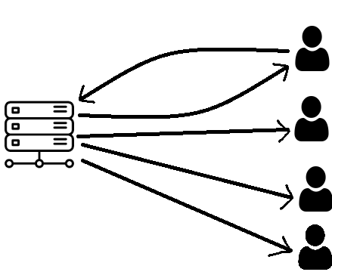
Caller
await Clients.Caller.SendAsync("Receive");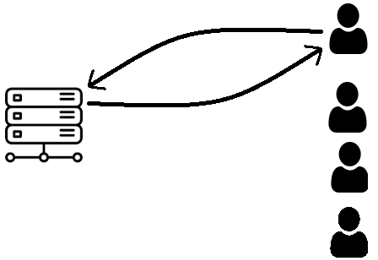
Others
await Clients.Others.SendAsync("Receive");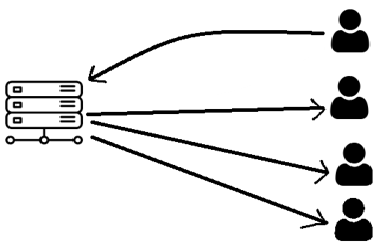
Specific Connection
//single Connection
await Clients.Client(connectionId).SendAsync("Receive");

//Multiple Connections
await Clients.Clients(connectionId1, connectionId2) .SendAsync("Receive");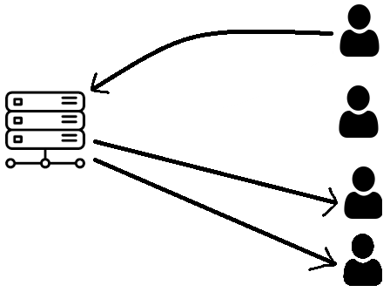
Specific User
//Specific User
await Clients.User(userId) .SendAsync("Receive");

//Multiple Users
await Clients.Users(user1, user2).SendAsync("Receive");
👉 user may have multiple active connections, and SignalR targets those connections associated with that user.
Group
Groups Join : adds the connection to the specified group. The group is created implicitly if it doesn't already exist.
await Groups.AddToGroupAsync( Context.ConnectionId, "Admins");
- Can a user be a member of multiple groups? Yes
- if user is disconnected, would it be removed from groups automatically? Yes
- can I add user to group by userid instead of ConnectionId? No
Specific Group
await Clients.Group("Admins").SendAsync("Receive");
Multiple Groups
await Clients.Groups("Admins", "HR") .SendAsync("Receive");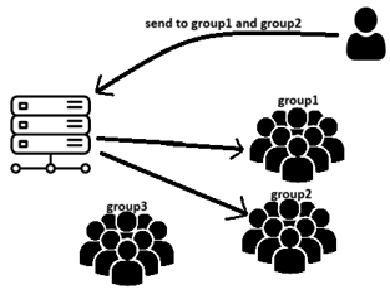
Leave
await Groups.RemoveFromGroupAsync( Context.ConnectionId, "Admins");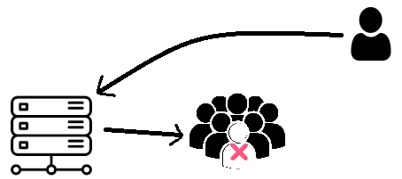
Important Tips: some signalr limitation
- SignalR doesn't provide a built-in API to query online users.sth. like GetOnlineUsers()
- SignalR doesn't provide a built-in API to query all groups or group membership. Sth. Like GetAllGroups() or GetGroupMembers(groupName)
- SignalR has no built-in API to get:
- Groups by UserId → ❌
- Groups by ConnectionId → ❌
- Members of a group → ❌
- List of groups → ❌
To achieve these you need to maintain this information yourself (e.g. database / Redis / in-memory collection).
sample Code:
public class ChatHub : Hub
{
// This approach works only on a single server. For a multi-server deployment, use a distributed presence store such as Redis.
private static readonly ConcurrentDictionary<string, string> Connections = new();

public async Task SendMessage(string user, string message)
{
    await Clients.All.SendAsync("ReceiveMessage", user, message);
}


public override Task OnConnectedAsync()
{
    var userId = Context.UserIdentifier!;
    Connections[Context.ConnectionId] = userId;

    return base.OnConnectedAsync();
}


public override Task OnDisconnectedAsync(Exception? exception)
{
    Connections.TryRemove(Context.ConnectionId, out _);

    return base.OnDisconnectedAsync(exception);
}
}
And then get online users like this:
var onlineUsers = Connections.Values.Distinct();