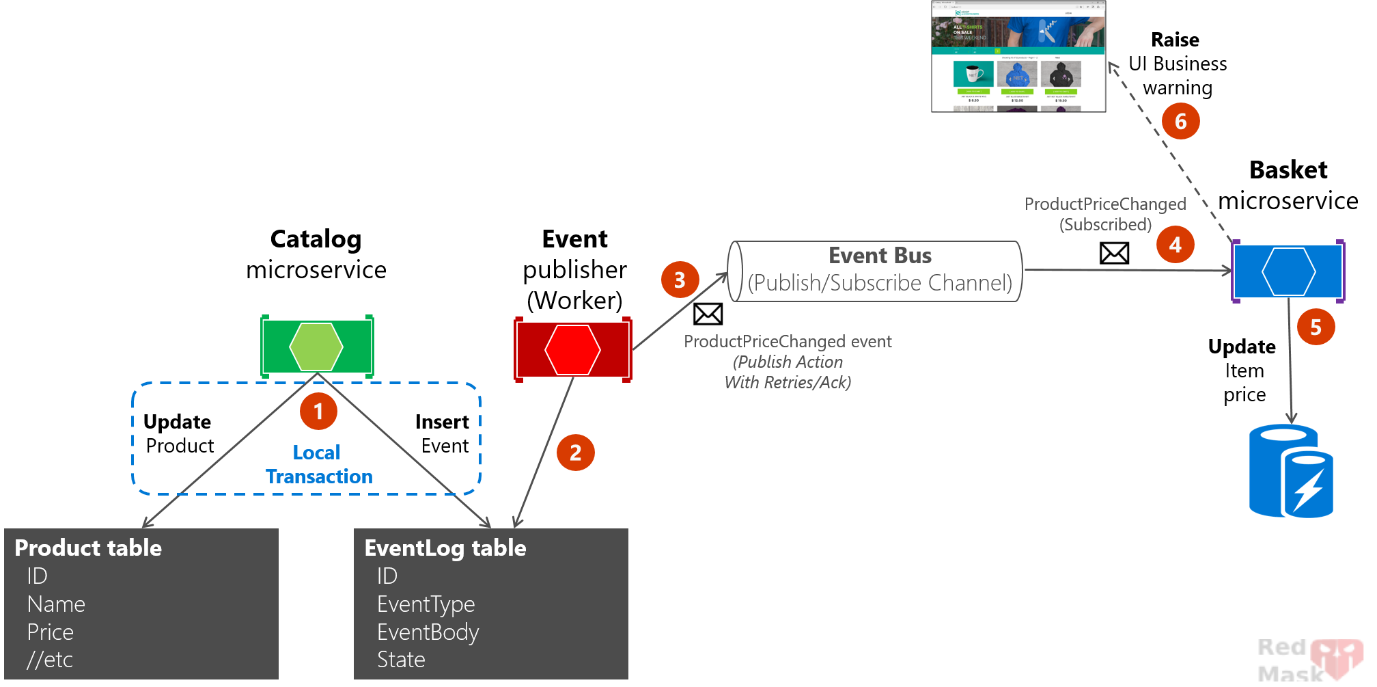
CAP is a .NET library that helps implement the Outbox Pattern and distributed event publishing reliably.
It supports multiple databases (SQL Server, MySQL, PostgreSQL, etc.) and message brokers (RabbitMQ, Kafka, Azure Service Bus).
It automatically stores events in an outbox table within your database transaction and publishes them asynchronously.
It handles retries, failure scenarios, and event deduplication.
CAP is a great fit if you want out-of-the-box support for transactional outbox + message broker integration.
It abstracts away a lot of complexity.
Widely used in .NET microservice and event-driven architectures.
Why use CAP?
- Transactional consistency: Your business data and events are saved atomically.
- Reliable event publishing: Events are published asynchronously with retries.
- Supports multiple brokers and databases.
- Minimal setup: Integrates easily with EF Core and other ORMs.
- Automatic cleanup and monitoring.
- Helps you avoid reinventing the wheel.
CAP supports most popular message queue as transport, following packages are available to install:
- PM> Install-Package DotNetCore.CAP.Kafka
- PM> Install-Package DotNetCore.CAP.RabbitMQ
- PM> Install-Package DotNetCore.CAP.AzureServiceBus
- PM> Install-Package DotNetCore.CAP.AmazonSQS
- PM> Install-Package DotNetCore.CAP.NATS
- PM> Install-Package DotNetCore.CAP.RedisStreams
- PM> Install-Package DotNetCore.CAP.Pulsar
CAP supports most popular database as event storage, following packages are available to install:
- PM> Install-Package DotNetCore.CAP.SqlServer
- PM> Install-Package DotNetCore.CAP.MySql
- PM> Install-Package DotNetCore.CAP.PostgreSql
- PM> Install-Package DotNetCore.CAP.MongoDB //need MongoDB 4.0+ cluster
simple CAP example in .NET using EF Core + RabbitMQ.
1-Create a new .NET project
(e.g., ASP.NET Core Web API or Console App)
dotnet new webapi -n CapExample
2-Add NuGet packages
 dotnet add package DotNetCore.CAP
 dotnet add package DotNetCore.CAP.RabbitMQ
 dotnet add package DotNetCore.CAP.SqlServer
 dotnet add package Microsoft.EntityFrameworkCore.SqlServer
 dotnet add package Microsoft.EntityFrameworkCore.Design
3-Set up EF Core DbContext and an example entity
public class MyDbContext : DbContext
{
    public DbSet<MyEntity> MyEntities { get; set; }

    public MyDbContext(DbContextOptions<MyDbContext> options) : base(options) { }
}


public class MyEntity
{
    public int Id { get; set; }
    public string Name { get; set; }
}
4-Configure CAP in Program.cs
builder.Services.AddDbContext<MyDbContext>(options =>    options.UseSqlServer(builder.Configuration.GetConnectionString("DefaultConnection")));

builder.Services.AddScoped<MyService>();

builder.Services.AddCap(x =>
{
    x.UseEntityFramework<MyDbContext>();//If you are using EF, you need to add the configuration:

    ////If you are using ADO.NET, choose to add configuration you needed:
    //x.UseSqlServer("Your ConnectionStrings");
    //x.UseMySql("Your ConnectionStrings");
    //x.UsePostgreSql("Your ConnectionStrings");

    ////CAP support RabbitMQ,Kafka,AzureService as the MQ, choose to add configuration you needed:
    x.UseRabbitMQ(cfg =>
    {
        cfg.HostName = "localhost";
        cfg.UserName = "guest";
        cfg.Password = "guest";
    });
    //x.UseKafka("ConnectionString");
    //x.UseAzureServiceBus("ConnectionString");
    //x.UseAmazonSQS();

    x.Version = "v1";
    x.FailedRetryCount = 5;
    x.FailedThresholdCallback = failed =>
    {
        Console.WriteLine($"Message processing failed: {failed.Message}");
    };
});
Add this to appsettings.json:
"ConnectionStrings": {
   "DefaultConnection": "Server=.;user ID=sa;Password=your_pass;initial catalog=cap_db;TrustServerCertificate=True;"
 }
More About CAP configuration:
These options control how CAP processes and retries failed messages.
builder.Services.AddCap(x =>
{
    ...


    x.ConsumerThreadCount = 1; // The number of consumer threads to process received messages.A higher value increases parallelism for subscribers.
    x.SucceedMessageExpiredAfter = 24*3600; // The time(in seconds) after which successful messages in the persistence store are deleted.
    x.FailedMessageExpiredAfter = 7*24*3600;  //The time(in seconds) after which failed messages are deleted.
    x.FailedRetryCount = 50;   // The maximum number of times a message consumption will be retried before it is marked as Failed and the FailedThresholdCallback is invoked.
    x.FailedRetryInterval = 60; //The interval(in seconds) at which failed messages will be retried.
    x.DefaultGroupName = "cap.default.group";  //The default consumer group name for subscribers that do not explicitly specify a Group in the[CapSubscribe] attribute.
    x.GroupNamePrefix = null; //A prefix to apply to all consumer group names(e.g., to namespace them by environment).

});
5-Create a service using CAP publisher
public class MyService(MyDbContext _dbContext, ICapPublisher _capPublisher)
{

    public async Task CreateEntityAndPublishEventAsync(string name)
    {
        // Start a transaction with CAP support
        using var transaction = await _dbContext.Database.BeginTransactionAsync(_capPublisher, autoCommit: true);

        var entity = new MyEntity { Name = name };
        _dbContext.MyEntities.Add(entity);
        await _dbContext.SaveChangesAsync();

        // Publish event - CAP stores it in outbox atomically within the same transaction
        await _capPublisher.PublishAsync("entity.created", new { entity.Id, entity.Name });
        // Transaction commits here, CAP outbox event saved atomically with business data
    }
}👉What Happens Without autoCommit: true ?
If you had not set autoCommit: true, the behavior would change significantly. The transaction would not automatically commit when the using block exits. and You must manually commit, You would need to explicitly call await transaction.CommitAsync(); at the end of the using block to save the data and the events permanently.
6-use it
app.MapGet("/api/test",async (MyService myService) =>
{
    await myService.CreateEntityAndPublishEventAsync("test entity");
});
Subscribe to the event (for example, in the same app or another microservice)
public class MyEventSubscriber : ICapSubscribe
{
    [CapSubscribe("entity.created")]
    public void HandleEntityCreated(dynamic data)
    {
        Console.WriteLine($"Received entity.created event with data: {data.Id} - {data.Name}");
        // Handle event (e.g., send notification, update cache)
    }
}
👉 When CAP startups, it will use the current assembly name as the default group name, if multiple same group subscribers subscribe to the same topic name, there is only one subscriber that can receive the message. Conversely, if subscribers are in different groups, they will all receive messages.
[CapSubscribe("xxx.services.show.time", Group = "group1" )]
public void ShowTime1(DateTime datetime)
{
}

[CapSubscribe("xxx.services.show.time", Group = "group2")]
public void ShowTime2(DateTime datetime)
{
}
Enable CAP dashboard
install packege
dotnet add package DotNetCore.CAP.Dashboardchange startup.cs
    builder.Services.AddCap(x =>
    {
        .....

        x.UseDashboard(); // Enable the dashboard
    });
run App and goto url : https://localhost:<your-port>/cap
You can visit that in your browser to monitor:
- Published and received messages
- Retry counts
- Consumer and producer statuses
- Event processing logs
Some Important and practical Points
Does The .NET CAP support idempotency on the consumer side?
This is a built-in feature designed to prevent message duplication when handling events or messages, especially in distributed systems where exactly-once delivery is hard to achieve.
CAP achieves consumer-side idempotency by maintaining a record of processed messages in the CAP tables in the database (specifically in the received table). When a consumer receives a message, CAP:
- Checks the received messages table to see if this message has already been processed.
- If the message has already been processed, CAP skips reprocessing it.
- If the message is new, CAP:
If in producer side if I wrongly publish one event twice, what will happen?
CAP’s default idempotency check on the consumer side is based on the unique message ID generated for each publish call. So even if the events have the same payload (data), if they are published in two separate capBus.Publish() calls, they are treated as two distinct messages.
What Can You Do to Prevent This?
Implement application-level idempotency by tracking unique business keys in your consumer logic.
[CapSubscribe("order.created")]
public async Task HandleOrderCreatedAsync(OrderDto order)
{
    if (_dbContext.Orders.Any(o => o.Id == order.Id))
    {
       // Already processed, skip
        return;
    }
    // Process order
}
What happens if I run multiple instances of my consumer (e.g., for scalability)? Will CAP handle this correctly? Will messages be processed only once across all instances?
Yes, .NET CAP supports running multiple consumer instances (horizontal scaling), and it ensures that each message is consumed by only one instance, not all of them — as long as you’re using a queue-based message broker like:
- RabbitMQ
- Kafka
- Azure Service Bus
When you publish a message to a topic (e.g., "order.created"), and multiple consumer instances are subscribed: CAP configures the message broker to ensure only one instance handles each message.
But other instances are my read-only (slave) and I want my master instance always get and process the message. How can I control this?
By default, CAP assumes that all running instances are equal . so if multiple instances are subscribed to a topic, any one of them may receive and process the message, depending on the broker’s load-balancing.
The cleanest approach is to conditionally register CAP subscribers only on the master instance and don’t even attach the [CapSubscribe] handlers on slave instances.
You can do this with an environment variable, config flag, or service discovery.
In appsettings.json:
{
  "Cap": {
    "IsMaster": true
  }
}
Startup.cs
    var isMaster = Configuration.GetValue<bool>("Cap: IsMaster ");
    if (isMaster)
    {
        // Register your CAP subscribers
        builder.Services.AddTransient<OrderCreatedHandler>();
    }


    builder.Services.AddCap(x =>
    {
        // CAP configuration
    });
