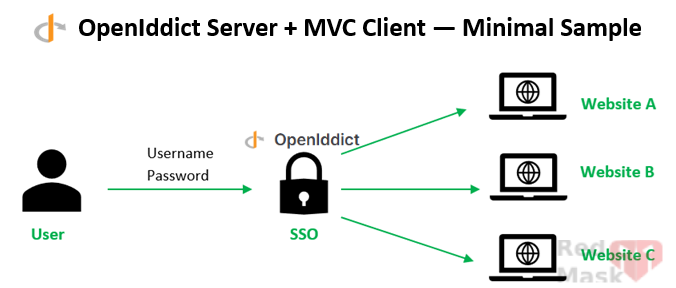
This guide demonstrates how to implement a central authentication system in ASP.NET Core using OpenIddict, a fully open-source alternative to Duende Identity. It includes a working AuthServer and MVC client, login, consent, and proper handling of first-time login flows.
What is OpenIddict?
OpenIddict is an open-source library for ASP.NET Core that lets you easily implement OpenID Connect and OAuth 2.0 servers.
- Acts as an authorization server.
- Supports OpenID Connect (authentication) and OAuth 2.0 (authorization).
- Integrates with ASP.NET Core Identity for user and role management.
- Handles token issuance (access, refresh, ID tokens) and validation.
- Lets you fully control login, consent, and error pages.
Create server instance
Create a solution (e.g. OpenIddictSample) and add a mvc project to it (e.g AuthServer)
Add these NuGet packages to AuthServer:
dotnet add package OpenIddict.AspNetCore
dotnet add package OpenIddict.EntityFrameworkCore
dotnet add package Microsoft.AspNetCore.Identity.EntityFrameworkCore
dotnet add package Microsoft.EntityFrameworkCore. SqlServer
Make ApplicationUser.cs
using Microsoft.AspNetCore.Identity;
public class ApplicationUser : IdentityUser { }
create ApplicationDbContext.cs and paste this
using Microsoft.AspNetCore.Identity.EntityFrameworkCore;
using Microsoft.EntityFrameworkCore;
using OpenIddict.EntityFrameworkCore.Models;

public class ApplicationDbContext : IdentityDbContext<ApplicationUser>
{
    public ApplicationDbContext(DbContextOptions<ApplicationDbContext> options) : base(options) { }

    protected override void OnModelCreating(ModelBuilder builder)
    {
        base.OnModelCreating(builder);
        builder.UseOpenIddict();   //← register OpenIddict entities
    }
}
OpenIddict defines four main entity types when using Entity Framework Core. Here’s a concise description of each:
1. Applications (OpenIddictApplication)
- Represents a client application that can request tokens from your authorization server.
- Stores client ID, client secret, redirect URIs, permissions, and display name.
- Example: an MVC app, SPA, or mobile client.
2. Authorizations (OpenIddictAuthorization)
- Represents a permission granted to a client by a user.
- Tied to a specific user, application, and set of scopes.
- Used mainly for long-lived grants (e.g., offline access).
3. Tokens (OpenIddictToken)
- Represents access tokens, refresh tokens, or ID tokens issued to a client.
- Tracks token type, status, creation/expiration time, and linked authorization.
- Important for token revocation, validation, and introspection.
4. Scopes (OpenIddictScope)
- Represents permissions that clients can request (like openid, profile, email).
- Scopes define what the client is allowed to access on behalf of the user.
Change program.cs
using Microsoft.AspNetCore.Identity;
using Microsoft.EntityFrameworkCore;
using OpenIddict.Abstractions;
using OpenIddict.Server.AspNetCore;
using static OpenIddict.Abstractions.OpenIddictConstants;

var builder = WebApplication.CreateBuilder(args);

builder.Services.AddControllersWithViews();

var connectionString = " Server=.;user ID=sa;Password=my_pass;initial catalog=my_db;TrustServerCertificate=True;";
// Configure database context
builder.Services.AddDbContext<ApplicationDbContext>(options =>
{
    options.UseSqlServer(connectionString); // Connect to SQL Server
    options.UseOpenIddict(); // Register OpenIddict entities
});

// Configure Identity
builder.Services.AddIdentity<ApplicationUser, IdentityRole>()
    .AddEntityFrameworkStores<ApplicationDbContext>() // Use EF stores
    .AddDefaultTokenProviders(); // Enables token-based features

// Configure OpenIddict
builder.Services.AddOpenIddict()
    .AddCore(options =>
    {
        options.UseEntityFrameworkCore()
               .UseDbContext<ApplicationDbContext>(); // Use EF for OpenIddict
    })
    .AddServer(options =>
    {
        // Register endpoints
        options.SetAuthorizationEndpointUris("/connect/authorize")
               .SetTokenEndpointUris("/connect/token")
               .SetUserinfoEndpointUris("/connect/userinfo");

        // Enable authorization code flow with PKCE
        options.AllowAuthorizationCodeFlow()
               .RequireProofKeyForCodeExchange();

        // Use temporary development certificates (replace with production certificates)
        options.AddDevelopmentEncryptionCertificate()
               .AddDevelopmentSigningCertificate();

        // Integrate with ASP.NET Core pipeline
        options.UseAspNetCore()
               .EnableAuthorizationEndpointPassthrough()
               .EnableTokenEndpointPassthrough();
    })
    .AddValidation(options =>
    {
        options.UseLocalServer();
        options.UseAspNetCore();
    });


var app = builder.Build();

// EF migrations / seed - create DB and seed a test user & client
using (var scope = app.Services.CreateScope())
{
    var db = scope.ServiceProvider.GetRequiredService<ApplicationDbContext>();
    db.Database.Migrate();

    var userMgr = scope.ServiceProvider.GetRequiredService<UserManager<ApplicationUser>>();
    var user = await userMgr.FindByNameAsync("vahidArya");
    if (user == null)
    {
        user = new ApplicationUser { UserName = "vahidArya", Email = "v.arya@example.com" };
        await userMgr.CreateAsync(user, "Pass123$");
    }

    var appManager = scope.ServiceProvider.GetRequiredService<IOpenIddictApplicationManager>();
    if (await appManager.FindByClientIdAsync("mvc_client") == null)
    {
        await appManager.CreateAsync(new OpenIddictApplicationDescriptor
        {
            ClientId = "mvc_client",
            ClientSecret = "secret",
            DisplayName = "MVC client",
            RedirectUris = { new Uri("https://localhost:5002/signin-oidc") },
            PostLogoutRedirectUris = { new Uri("https://localhost:5002/signout-callback-oidc") },
            Permissions =
            {
                Permissions.Endpoints.Authorization,
                Permissions.Endpoints.Token,
                Permissions.GrantTypes.AuthorizationCode,
                Permissions.ResponseTypes.Code,
                Permissions.Scopes.Profile,
                Permissions.Scopes.Email,
                Permissions.Scopes.OpenId,
            }
        });
    }
}

app.UseDeveloperExceptionPage();
app.UseStaticFiles();
app.UseRouting();
app.UseAuthentication();
app.UseAuthorization();

app.MapDefaultControllerRoute();
app.Run();
Controllers/AccountController.cs (Login / Logout ui)
👉OpenIddict focuses on protocol handling (OAuth 2.0, OpenID Connect).You control the user experience fully: login, consent, error pages, branding.
using Microsoft.AspNetCore.Identity;
using Microsoft.AspNetCore.Mvc;

public class AccountController : Controller
{
    private readonly SignInManager<ApplicationUser> _signInManager;
    private readonly UserManager<ApplicationUser> _userManager;

    public AccountController(SignInManager<ApplicationUser> signInManager, UserManager<ApplicationUser> userManager)
    {
        _signInManager = signInManager;
        _userManager = userManager;
    }

    [HttpGet]
    public IActionResult Login(string returnUrl = "/") => View(new LoginModel { ReturnUrl = returnUrl });

    [HttpPost]
    public async Task<IActionResult> Login(LoginModel model)
    {
        if (!ModelState.IsValid) return View(model);

        var user = await _userManager.FindByNameAsync(model.Username);
        if (user == null) { ModelState.AddModelError("", "Invalid credentials"); return View(model); }

        var result = await _signInManager.PasswordSignInAsync(user, model.Password, model.RememberMe, lockoutOnFailure: false);
        if (!result.Succeeded) { ModelState.AddModelError("", "Invalid credentials"); return View(model); }

        return Redirect(model.ReturnUrl ?? "/");
    }

    [HttpPost]
    public async Task<IActionResult> Logout()
    {
        await _signInManager.SignOutAsync();
        return RedirectToAction("Index", "Home");
    }
}

public class LoginModel
{
    public string Username { get; set; }
    public string Password { get; set; }
    public bool RememberMe { get; set; }
    public string ReturnUrl { get; set; }
}
Views/Account/Login.cshtml
@model LoginModel
<form method="post" asp-action="Login">
    <input asp-for="Username" placeholder="username" />
    <input asp-for="Password" placeholder="password" type="password" />
    <label><input asp-for="RememberMe" /> Remember</label>
    <input type="hidden" asp-for="ReturnUrl" />
    <button type="submit">Login</button>
</form>
Controllers/AuthorizationController.cs
controller handles the /connect/authorize endpoint and issues an authorization code for authenticated local users
👉This simplified controller,In production you should implement proper consent, scopes handling and error cases.
using Microsoft.AspNetCore.Authorization;
using Microsoft.AspNetCore.Mvc;
using OpenIddict.Abstractions;
using OpenIddict.Server.AspNetCore;
using System.Security.Claims;

[AllowAnonymous]
public class AuthorizationController : Controller
{
    [HttpGet("/connect/authorize")]
    public IActionResult Authorize()
    {
        // if the user is not authenticated, redirect to local login page with returnUrl to preserve OpenID flow
        if (!User?.Identity?.IsAuthenticated ?? true)
        {
            return Challenge(new AuthenticationProperties { RedirectUri = Url.Action("Authorize") });
        }

        // for brevity we let OpenIddict handle the rest via the default pipeline
        return View("Consent");
    }

    [HttpPost("/connect/authorize")]
    public async Task<IActionResult> Accept()
    {
        var identity = new ClaimsIdentity(OpenIddictServerAspNetCoreDefaults.AuthenticationScheme);
        identity.AddClaim(Claims.Subject, User.FindFirstValue(ClaimTypes.NameIdentifier) ?? User.Identity.Name);
        identity.AddClaim(Claims.Name, User.Identity.Name);

        var principal = new ClaimsPrincipal(identity);
        principal.SetScopes(new[] { Scopes.OpenId, Scopes.Profile, Scopes.Email });

        return SignIn(principal, OpenIddictServerAspNetCoreDefaults.AuthenticationScheme);
    }
}
Views/Authorization/Consent.cshtml
<div class="row justify-content-center mt-5">
    <div class="col-6 border rounded py-5">
        <form asp-route="/connect/authorize">
            @foreach (var parameter in Context.Request.Query)
            {
                <input type="hidden" name="@parameter.Key" value="@parameter.Value" />
            }

            <div class="form-group mt-4 text-center">
                <button class="btn btn-primary w-50" type="submit" name="submit.Accept" value="true">
                    Accept
                </button>
            </div>
        </form>
    </div>
</div>
Create client instance(MVC client)
create a mvc project to it (e.g MvcClient)
 dotnet add package Microsoft.AspNetCore.Authentication.OpenIdConnect dotnet add package Microsoft.AspNetCore.Authentication.Cookies dotnet add package Microsoft.AspNetCore.Authentication.OpenIdConnect dotnet add package Microsoft.AspNetCore.Authentication.Cookies |
Program.cs
var builder = WebApplication.CreateBuilder(args);

builder.Services.AddControllersWithViews();

builder.Services.AddAuthentication(options =>
{
    options.DefaultScheme = "Cookies";
    options.DefaultChallengeScheme = "oidc";
})
.AddCookie("Cookies")
.AddOpenIdConnect("oidc", options =>
{
    options.Authority = "https://localhost:5001"; // AuthServer URL
    options.ClientId = "mvc_client";
    options.ClientSecret = "secret";
    options.ResponseType = "code";
    options.Scope.Add("openid");
    options.Scope.Add("profile");
    options.SaveTokens = true;
    options.RequireHttpsMetadata = true;
});

var app = builder.Build();
app.UseDeveloperExceptionPage();
app.UseStaticFiles();
app.UseRouting();
app.UseAuthentication();
app.UseAuthorization();
app.MapDefaultControllerRoute();
app.Run();
Controllers/HomeController.cs (simple login/logout links)
using Microsoft.AspNetCore.Authorization;
using Microsoft.AspNetCore.Mvc;

public class HomeController : Controller
{
    public IActionResult Index() => View();

    [Authorize]
    public IActionResult Secure() => View();

    public IActionResult Login() => Challenge(new AuthenticationProperties { RedirectUri = "/" }, "oidc");

    public IActionResult Logout() => SignOut(new AuthenticationProperties { RedirectUri = "/" }, "Cookies", "oidc");
}
Views/Shared/_Layout.cshtml
Add links to login/logout:
@if (User?.Identity?.IsAuthenticated ?? false)
{
    <text>Hello @User.Identity.Name</text>
    <form method="post" asp-controller="Home" asp-action="Logout"><button type="submit">Logout</button></form>
}
else
{
    <a asp-controller="Home" asp-action="Login">Login</a>
}
Running the sample
1. Make sure the AuthServer runs on https://localhost:5001 and the MvcClient runs on https://localhost:5002 (configure launchSettings or use dotnet run --urls "https://localhost:5001").
2. Apply EF migrations for AuthServer (create migrations then dotnet ef database update).
- dotnet ef migrations add InitialCreate --project AuthServer
- dotnet ef database update --project AuthServer
3. Start AuthServer, then start MvcClient.
4. Browse to the client and click Login — you will be redirected to the AuthServer login page.
