The Microsoft.AspNetCore.RateLimiting middleware provides rate limiting middleware. Apps configure rate limiting policies and then attach the policies to endpoints.
Why use rate limiting
Rate limiting can be used for managing the flow of incoming requests to an app. Key reasons to implement rate limiting:
- Preventing Abuse: Rate limiting helps protect an app from abuse by limiting the number of requests a user or client can make in a given time period. This is particularly important for public APIs.
- Ensuring Fair Usage: By setting limits, all users have fair access to resources, preventing users from monopolizing the system.
- Protecting Resources: Rate limiting helps prevent server overload by controlling the number of requests that can be processed, thus protecting the backend resources from being overwhelmed.
- Enhancing Security: It can mitigate the risk of Denial of Service (DoS) attacks by limiting the rate at which requests are processed, making it harder for attackers to flood a system.
- Improving Performance: By controlling the rate of incoming requests, optimal performance and responsiveness of an app can be maintained, ensuring a better user experience.
- Cost Management: For services that incur costs based on usage, rate limiting can help manage and predict expenses by controlling the volume of requests processed.
1. Fixed Window Rate Limiting
✔️Time is divided into fixed, discrete intervals (e.g., 0–10 sec, 10–20 sec, 20–30 sec).
✔️The request count resets at the start of each new interval.
So if you hit the limit at the end of one window, you get a fresh quota at the start of the next.
Problem: Can cause bursts at window boundaries (e.g., making max requests at 9.9s, then immediately again at 10.1s).
builder.Services.AddRateLimiter(options =>
{
    options.AddFixedWindowLimiter("fixedWindow", opt => // Allows 5 requests every 10 seconds per client.
    {
        opt.PermitLimit = 5; // Allow 5  requests
        opt.Window = TimeSpan.FromSeconds(10); // Per 10-second window
        opt.QueueProcessingOrder = QueueProcessingOrder.OldestFirst; // Process oldest requests first
        opt.QueueLimit = 2;// the maximum number of requests that can be queued (waiting) to be processed when the rate limit is currently exceeded.
    });
});

var app = builder.Build();

app.UseRouting();

app.UseRateLimiter();

app.MapGet("/", () => "Hello World!")
        .RequireRateLimiting("fixedWindow");  //Apply rate limiting to WebAPI Endpoints

// Apply rate limiting to MVC Controllers
app.UseEndpoints(endpoints =>
{
    endpoints.MapControllers().RequireRateLimiting("fixed");
});👉QueueLimit is the maximum number of requests that can be queued (waiting) to be processed when the rate limit is currently exceeded.
When requests come in beyond the PermitLimit during the current window, the limiter can either:
• Reject the request immediately (HTTP 429), or
• Queue the request for processing as soon as a permit frees up.
2. Sliding Window Rate Limiting
✔️The window “slides” along with the current time.
✔️At any point, the system counts requests in the last X seconds (e.g., last 10 seconds from now).
✔️Older requests falling outside this window are forgotten.
✔️This smooths out bursts because the window moves continuously.
So if you made a request 11 seconds ago, it no longer counts against the current limit.
builder.Services.AddRateLimiter(options =>
{
    options.AddSlidingWindowLimiter(policyName: "slidingPolicy", opt =>
    {
        opt.PermitLimit = 10;
        opt.Window = TimeSpan.FromSeconds(10);
        opt.SegmentsPerWindow = 1;//Specifies the maximum number of segments a window is divided into.
        opt.QueueProcessingOrder = QueueProcessingOrder.OldestFirst;
        opt.QueueLimit = 2;
    });
});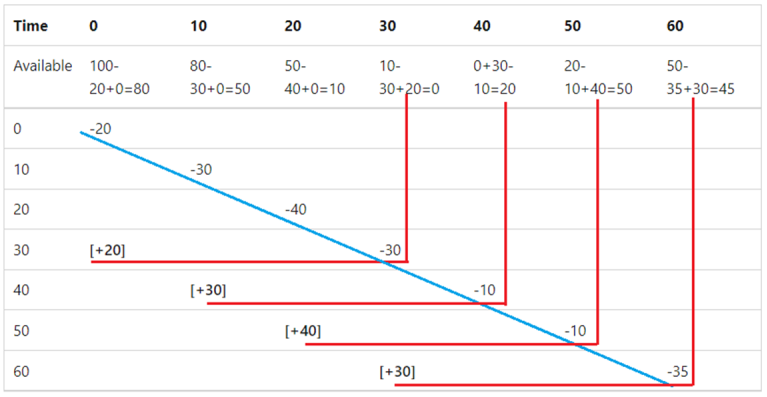
(Consider the following table that shows a sliding window limiter with a 30-second window, three segments per window, and a limit of 100 requests)
3. Token bucket limiter
The token bucket limiter is similar to the sliding window limiter, but rather than adding back the requests taken from the expired segment, a fixed number of tokens are added each replenishment period. The tokens added each segment can't increase the available tokens to a number higher than the token bucket limit.
builder.Services.AddRateLimiter(options =>
{
    options.AddTokenBucketLimiter(policyName: "tokenPolicy", options =>
     {
         options.TokenLimit = 100;//like PermitLimit
         options.QueueProcessingOrder = QueueProcessingOrder.OldestFirst;
         options.QueueLimit = 2;

//When AutoReplenishment is set to true, an internal timer replenishes the tokens every ReplenishmentPeriod;
         //when set to false, the app must call TryReplenish on the limiter.
         options.TokensPerPeriod = 20;                          //count of replenishes the tokens in each period
         options.AutoReplenishment = true;                      //auto replenishe token or manual
         options.ReplenishmentPeriod = TimeSpan.FromSeconds(10);//period to replenishes the tokens

     });
});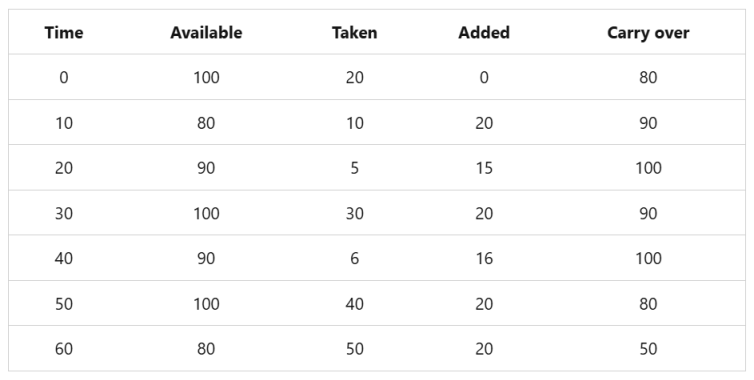
(limit of 100 tokens and a 10-second replenishment period.)
4.Concurrency limiter
The concurrency limiter limits the number of concurrent requests. Each request reduces the concurrency limit by one. When a request completes, the limit is increased by one. Unlike the other requests limiters that limit the total number of requests for a specified period, the concurrency limiter limits only the number of concurrent requests and doesn't cap the number of requests in a time period.
builder.Services.AddRateLimiter(options =>
{    options.AddConcurrencyLimiter(policyName: "concurrencyPolicy", opt =>
    {
        opt.PermitLimit = 100;
        opt.QueueProcessingOrder = QueueProcessingOrder.OldestFirst;
        opt.QueueLimit = 2;
    });
});
Rate Limiting Partitions
By default The rate limiter identifies clients based on the HttpContext using the Partition delegate.
If you don’t specify a custom partition key, it treats all requests as a single client (i.e., global rate limit).
Rate limiting partitions divide the traffic into separate "buckets" that each get their own rate limit counters. This allows for more granular control than a single global counter. The partition "buckets" are defined by different keys (like user ID, IP address, or API key).
Benefits of Partitioning
• Fairness: One user can't consume the entire rate limit for everyone
• Granularity: Different limits for different users/resources
• Security: Better protection against targeted abuse
• Tiered Service: Support for service tiers with different limits
By IP Address
options.GlobalLimiter = PartitionedRateLimiter.Create<HttpContext, string>(httpContext =>
    RateLimitPartition.GetFixedWindowLimiter(
        partitionKey: httpContext.Connection.RemoteIpAddress?.ToString() ?? "unknown",
        factory: _ => new FixedWindowRateLimiterOptions
        {
            PermitLimit = 50,
            Window = TimeSpan.FromMinutes(1)
        }));
By User Identity
options.GlobalLimiter = PartitionedRateLimiter.Create<HttpContext, string>(httpContext =>
    RateLimitPartition.GetFixedWindowLimiter(
        partitionKey: httpContext.User.Identity?.Name ?? "anonymous",
        factory: _ => new FixedWindowRateLimiterOptions
        {
            PermitLimit = 100,
            Window = TimeSpan.FromMinutes(1)
        }));
EnableRateLimiting and DisableRateLimiting attributes
The [EnableRateLimiting] and [DisableRateLimiting] attributes can be applied to a Controller, action method, or Razor Page.
👉 For Razor Pages, the attribute must be applied to the Razor Page and not the page handlers. For example, [EnableRateLimiting] can't be applied to OnGet, OnPost, or any other page handler.
👉The [DisableRateLimiting] attribute disables rate limiting to the Controller, action method, or Razor Page regardless of named rate limiters or global limiters applied.
✔️Enable Rate Limiting
1. globally
    app.MapRazorPages().RequireRateLimiting(slidingPolicy);
    app.MapDefaultControllerRoute().RequireRateLimiting(fixedPolicy);
   app.UseEndpoints(endpoints =>// Apply rate limiting to MVC Controllers
   {
            endpoints.MapControllers().RequireRateLimiting("fixed");
    });
2. using attribute
[EnableRateLimiting("fixed")]
public class Home2Controller : Controller✔️Disable Rate Limiting
[DisableRateLimiting]
    public ActionResult NoLimit(){}
