Table of content
- Introduction (what is YARP, why use it)
- Getting Started (basic setup, simple routing)
- Load Balancing
- Health Checks
- Authentication & Authorization
- Session Affinity
- Rate Limiting
Introduction to YARP
YARP (Yet Another Reverse Proxy) is a highly customizable reverse proxy library for .NET. It's designed to provide a robust, flexible, scalable, secure, and easy to use proxy framework. YARP helps developers create powerful and efficient reverse proxy solutions tailored to their specific needs.
What a reverse proxy does
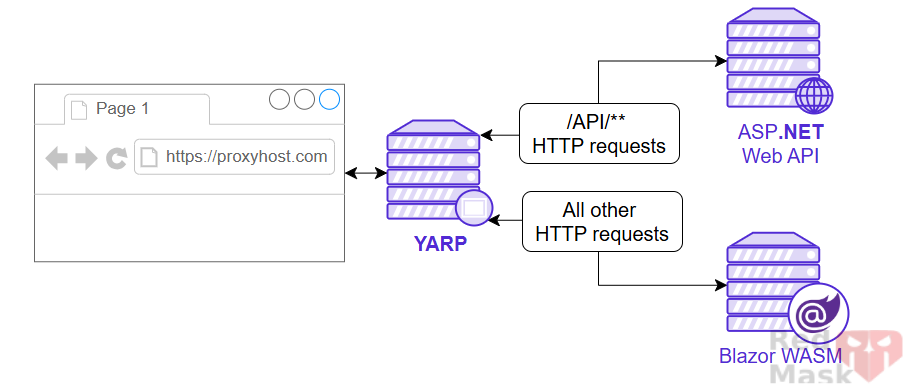
A reverse proxy is a server that sits between client devices and backend servers. It forwards client requests to the appropriate backend server and then returns the server's response to the client. A reverse proxy provides several benefits:
- Routing: Direct requests to different backend services based on URL or headers.
- Load Balancing: Distribute incoming traffic evenly among backend instances.
- Scalability: Improve capacity by scaling backend servers transparently.
- SSL/TLS Termination: Handle HTTPS connections at the proxy layer.
- Connection abstraction: Decouple clients from backend URL structure.
- Security: Protect backend services by filtering requests and enforcing policies.
- Caching: Reduce backend load by serving cached responses.
- Versioning: Route traffic to different service versions for gradual rollouts.
Getting started with YARP
1- Create a new project
dotnet new web -n MyProxy2- Add the package reference
dotnet add package Yarp.ReverseProxy3- Add the YARP Middleware
var builder = WebApplication.CreateBuilder(args);

// Add the reverse proxy capability to the server
builder.Services.AddReverseProxy()
                             //Initialize the reverse proxy from the "ReverseProxy" section of configuration
                            .LoadFromConfig(builder.Configuration.GetSection("ReverseProxy"));

var app = builder.Build();

// Register the reverse proxy routes
app.MapReverseProxy();

app.Run();
4- Configuring YARP via appsettings.json
"ReverseProxy": {
   "Routes":
   {
     "route1" :  // a unique name
     {
       "ClusterId": "cluster1", //refers to the name of an entry in the clusters section.
       "Match": {
         "Path": "{**catch-all}"
       }
     }
   },
   "Clusters": {
     "cluster1": {
       "Destinations": {
         "destination1": {
          "Address": "https://localhost:4444"
         }
       }
     }
   }
 }
or
Configuring YARP Programmatically in code (program.cs)
builder.Services.AddReverseProxy()
    .LoadFromMemory(
        [
            new RouteConfig
            {
                RouteId = "wallet-route",
                ClusterId = "wallet-Cluster",
                Match = new() { Path = "{**catch-all}" },
            }
        ],
        [
            new ClusterConfig
            {
                ClusterId = "wallet-Cluster",
                Destinations = new Dictionary<string, DestinationConfig>(StringComparer.OrdinalIgnoreCase)
                {
                    { "wallet", new() { Address = "https://localhost:7147" } }
                },
            }
        ])
How To Test
1- Add new awbapi project
dotnet new webapi -o ServiceOrder2 - Replace this to program.cs
var builder = WebApplication.CreateBuilder(args);
var app = builder.Build();
app.UseHttpsRedirection();
app.MapGet("/weatherforecast", () =>
{
    var forecast = Enumerable.Range(1, 5).Select(index =>
        new {
           DateOnly= DateOnly.FromDateTime(DateTime.Now.AddDays(index)),
           Age= Random.Shared.Next(-20, 55)
        })
        .ToArray();
    return forecast;
});
app.Run();
Run both the gateway and the backend service,
then test the proxy using your preferred HTTP client such as Postman, curl or a web browser.
When you send a request to the gateway URL, YARP receives the request, forwards it to the appropriate backend service, and then returns the backend’s response back to you.
|
|

{**catch-all} and {**remainder} and {**any} in YARP path config?
For path matching, {**catch-all} and {**remainder} and {**any} doesn't have any differences. No matter we define path as blog/{**remainder} or blog/{**catch-all} or or blog/{**any}, they will all match url blog/route1/route2. The only difference is the variable name, when we use {**remainder}, we could say the url we matched for remainder is route1/route2. If we used {**any}, we could say the url we matched for any is route1/route2.
However, if you use a single asterisk like {*any}, the behavior changes: it captures only up to the next slash, so the matched value would be "route1%2Froute2" (URL-encoded).
👉Asterisk * or double asterisk ** Can be used as a prefix to a route parameter to bind to the rest of the URI. Are called a catch-all parameters. For example, blog/{**slug}: Matches any URI that starts with blog/ and has any value following it. The value following blog/ is assigned to the slug route value.
• {**parameter} captures the remainder of the path as a single string, including slashes.
• {*parameter} captures only up to the next slash.
Example:
Path template: blog/{**slug}
URL: blog/route1/route2
slug = "route1/route2"
Load balancing
Whenever there are multiple healthy destinations available, YARP has to decide which one to use for a given request. YARP ships with built-in load-balancing algorithms, but also offers extensibility for any custom load balancing approach.
in gateway project
 new ClusterConfig
  {
      ClusterId = "orderService",
      Destinations = new Dictionary<string, DestinationConfig>
      {
          { "order", new() { Address = "https://localhost:7246" } }
      },
      LoadBalancingPolicy="Random"
} LoadBalancingPolicies:
- PowerOfTwoChoices (default): Select two random destinations and then select the one with the least assigned requests
- FirstAlphabetical: Select the alphabetically first available destination without considering load. This is useful for dual destination fail-over systems.
- Random: Select a destination randomly.
- RoundRobin: Select a destination by cycling through them in order.
- LeastRequests: Select the destination with the least assigned requests. This requires examining all destinations.
Extensibility:
// Implement the ILoadBalancingPolicy
public sealed class MyCustomeLoadBalancingPolicy : ILoadBalancingPolicy
{
    public string Name => "MyCustome";

    public DestinationState? PickDestination(HttpContext context, ClusterState cluster, IReadOnlyList<DestinationState> availableDestinations)
    {
        return availableDestinations[^1];
    }
}
Register it in DI in ConfigureServices method
services.AddSingleton<ILoadBalancingPolicy, LastLoadBalancingPolicy>();
Set the LoadBalancingPolicy on the cluster
cluster.LoadBalancingPolicy = "MyCustome";
Heath check
YARP can proactively monitor destination health by sending periodic probing requests to designated health endpoints and analyzing responses. That analysis is performed by an active health check policy specified for a cluster and results in the calculation of the new destination health states.
in gateway project
new ClusterConfig
{
    ClusterId = "orderService",
    Destinations = new Dictionary<string, DestinationConfig>
    {
        { "order", new() { Address = "https://localhost:7246" } }
    },
    HealthCheck=new()
    {
        Active=new()
        {
            Enabled=true,
            Interval=TimeSpan.FromSeconds(20),
            Timeout=TimeSpan.FromSeconds(4),
            Policy= "ConsecutiveFailures",//checks how many times the endpoint fails consecutively before marking unhealthy
            Path= "/health", // API endpoint to query for health state
            Query= "?s=ping"
        }
    }
}
In client api:
app.MapGet("/health", (string s) =>
{
    return "pong";
});
Here you can see log on health check
Success:

Error:

Authentication and Authorization
The reverse proxy can be used to authenticate and authorize requests before they are proxied to the destination servers. This can reduce load on the destination servers, add a layer of protection, and ensure consistent policies are implemented across your applications
builder.Services.AddAuthentication()
                .AddJwtBearer("some-scheme", jwtOptions =>
                {
                    jwtOptions.MetadataAddress = builder.Configuration["Api:MetadataAddress"];
                    // Optional if the MetadataAddress is specified
                    jwtOptions.Authority = builder.Configuration["Api:Authority"];
                    jwtOptions.Audience = builder.Configuration["Api:Audience"];
                    jwtOptions.TokenValidationParameters = new ()
                    {
                        ValidateIssuer = true,
                        ValidateAudience = true,
                        ValidateIssuerSigningKey = true,
                        ValidAudiences = builder.Configuration.GetSection("Api:ValidAudiences").Get<string[]>(),
                        ValidIssuers = builder.Configuration.GetSection("Api:ValidIssuers").Get<string[]>()
                    };

                    jwtOptions.MapInboundClaims = false;
                });

builder.Services.AddAuthorization(options =>
{
    options.AddPolicy("customPolicy", policy => policy.RequireAuthenticatedUser());
    options.AddPolicy("customPolicy2", policy => policy.AddAuthenticationSchemes(["some-scheme"]).RequireAuthenticatedUser());
});
Applying Authentication and Authorization Middleware
app.UseAuthentication();
app.UseAuthorization();
app.MapReverseProxy();
Protecting Routes with Authorization Policies
{
  "ReverseProxy": {
    "Routes": {
      "secureRoute": {
        "ClusterId": "secureCluster",
        "AuthorizationPolicy": "customPolicy",
        "Match": {
          "Path": "/secure/{**catch-all}"
        }
      }
    },
    "Clusters": {
      "secureCluster": {
        "Destinations": {
          "destination1": {
            "Address": "https://localhost:5001"
          }
        }
      }
    }
  }
}
Session Affinity
Is a load balancer feature that ensures all requests from the same client go to the same backend instance.
- This is also called sticky sessions.
- It works by adding a cookie (or using a header) so that future requests from the same client are routed to the same server instance.
👉 This is useful if your backend service keeps in-memory session data (e.g., ASP.NET Core ISession, caching user shopping carts, etc.). Without affinity, load balancing might send different requests from the same user to different servers, breaking state.
new ClusterConfig
{
     ClusterId = "sso",
     Destinations = new Dictionary<string, DestinationConfig>(StringComparer.OrdinalIgnoreCase)
     {
         { "sso", new() { Address = "https://localhost:7213" } }
     },
     SessionAffinity = new SessionAffinityConfig
     {
         // Turns session affinity on or off
         Enabled = true,// defaults to 'false'

         //What happens if the original backend is unavailable:
         //- Redistribute: Retry load balancing.
         //- Return503Error: Return HTTP 503 error.
         FailurePolicy = "Return503Error",// default=>'Redistribute'

         //The mechanism for affinity:
         //- HashCookie (default): Uses a cookie hashed to determine server.
         //- ArrCookie: Uses Microsoft Application Request Routing cookie.
         //- Cookie: Custom cookie.
         //- CustomHeader: Uses a header value
         Policy = "HashCookie",// default=>'HashCookie'


         //Name of the cookie or header used for affinity.
         AffinityKeyName = "Key1",

         //Settings for the cookie used (domain, expiration, security flags, path, etc.).
         //configuring the cookie used with the HashCookie, ArrCookie and Cookie policies
         Cookie = new SessionAffinityCookieConfig
         {
             Domain = "mydomain",
             Expiration = TimeSpan.FromHours(3),
             HttpOnly = true,
             IsEssential = true,
             MaxAge = TimeSpan.FromDays(1),
             Path = "mypath",
             SameSite = Microsoft.AspNetCore.Http.SameSiteMode.Strict,
             SecurePolicy = Microsoft.AspNetCore.Http.CookieSecurePolicy.SameAsRequest
         }
     }
}
Configuring Session Affinity in appsettings.json
{
  "ReverseProxy": {
    "Routes": {
      "sso-route": {
        "ClusterId": "sso-cluster",
        "Match": {
          "Path": "/sso/{**catch-all}"
        }
      }
    },
    "Clusters": {
      "sso-cluster": {
        "Destinations": {
          "sso-destination": {
            "Address": "https://localhost:7213"
          }
        },
        "SessionAffinity": {
          "Enabled": true,
          "FailurePolicy": "Return503Error",  // Or "Redistribute"
          "Policy": "HashCookie",             // HashCookie | ArrCookie | Cookie | CustomHeader
          "AffinityKeyName": "Key1",
          "Cookie": {
            "Domain": "mydomain",
            "Expiration": "03:00:00",          // 3 hours in HH:mm:ss format
            "HttpOnly": true,
            "IsEssential": true,
            "MaxAge": "1.00:00:00",            // 1 day
            "Path": "/mypath",
            "SameSite": "Strict",               // Can be None, Lax, Strict
            "SecurePolicy": "SameAsRequest"    // Can be None, Always, SameAsRequest
          }
        }
      }
    }
  }
}
How Different Affinity Policies Work
- HashCookie: The most common method where YARP issues a cookie containing a hash that maps to a backend instance.
- Cookie: Uses a custom cookie for affinity; you can control the cookie content and name.
- ArrCookie: Compatible with Microsoft Application Request Routing (ARR) affinity cookie.
- CustomHeader: Routes based on a custom HTTP header provided by the client.
FailurePolicy
- Redistribute - tries to establish a new affinity to one of available healthy destinations by skipping the affinity lookup step and passing all healthy destination to the load balancer the same way it is done for a request without any affinity. Request processing continues.
- Return503Error - sends a 503 response back to the client and request processing is terminated.
How it works step by step:
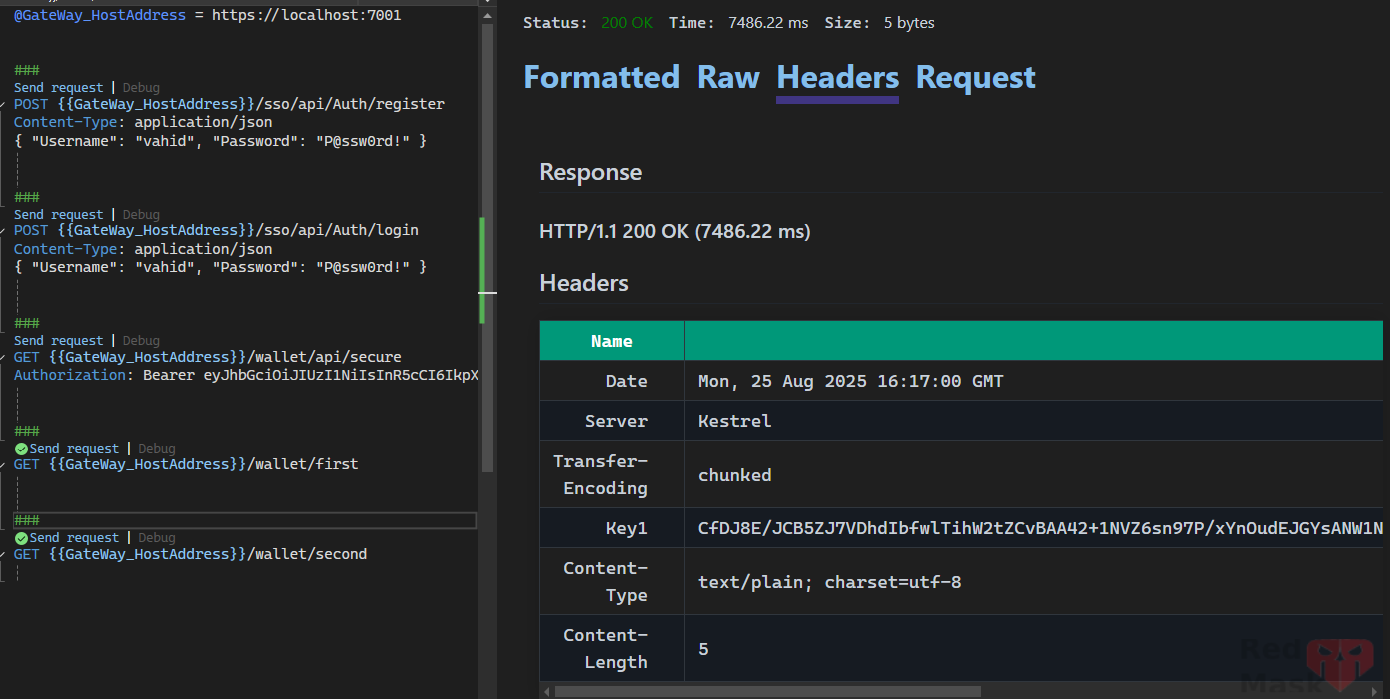
- First request:
- Client sends a request to YARP.
- YARP picks a backend server using its normal load-balancing strategy (round-robin, least requests, etc.).
- YARP also issues a session affinity cookie (by default) and returns it in the response.
- Next requests from same client:
- Client automatically sends the cookie back.
- YARP sees the cookie and routes the request to the same backend instance as before.
- If that backend is unavailable:
- YARP can “fail over” to another backend and issue a new cookie (configurable).
If set Policy = "Cookie"

If set Policy = "ArrCookie"

If set Policy = "HashCookie"

Rate Limiting
The reverse proxy can be used to rate-limit requests before they are proxied to the destination servers. This can reduce load on the destination servers, add a layer of protection, and ensure consistent policies are implemented across your applications.
{
  "ReverseProxy": {
    "Routes": {
      "route1" : {
        "ClusterId": "cluster1",
        "RateLimiterPolicy": "customPolicy",
        "Match": {
          "Hosts": [ "localhost" ]
        }
      }
    },
    "Clusters": {
      "cluster1": {
        "Destinations": {
          "cluster1/destination1": {
            "Address": "https://localhost:10001/"
          }
        }
      }
    }
  }
}
RateLimiter policies can be configured in services as follows: More Info about RateLimiter policies →
builder.Services.AddRateLimiter(options =>
{
    options.AddFixedWindowLimiter("customPolicy", opt =>
    {
        opt.PermitLimit = 4;
        opt.Window = TimeSpan.FromSeconds(12);
        opt.QueueProcessingOrder = QueueProcessingOrder.OldestFirst;
        opt.QueueLimit = 2;
    });
});
Then add the RateLimiter middleware.
app.UseRateLimiter();
app.MapReverseProxy();
Caching
The reverse proxy can be used to cache proxied responses and serve requests before they are proxied to the destination servers. This can reduce load on the destination servers, add a layer of protection, and ensure consistent policies are implemented across your applications.
Output cache policies can be configured in Program.cs as follows:
var builder = WebApplication.CreateBuilder(args);
builder.Services.AddOutputCache(options =>
{
    options.AddPolicy("customPolicy", builder => builder.Expire(TimeSpan.FromSeconds(20)));
});
Then add the output caching middleware:
var app = builder.Build();
app.UseOutputCache();
app.MapReverseProxy();
bind policy to route in config
{
  "ReverseProxy": {
    "Routes": {
      "route1" : {
        "ClusterId": "cluster1",
        "OutputCachePolicy": "customPolicy",
        "Match": {
          "Hosts": [ "localhost" ]
        }
      }
    },
    "Clusters": {
      "cluster1": {
        "Destinations": {
          "cluster1/destination1": {
            "Address": "https://localhost:10001/"
          }
        }
      }
    }
  }
}